Add tasks from Telegram
Add a task from your phone while you are away from Hule: send the Hule bot one message, tap a list, and the task is there. Name a day in the message (see the example in step 1) and it becomes the due date (due days).
Before you start
Connect your account to Telegram
The bot works only with a Hule account connected to Telegram. If you signed up with the Telegram button, it already is; skip to step 5.
In Hule, open the menu at the bottom of the sidebar (your name) and choose User settings. The settings open.
Under Account, open Sign-in. You see your sign-in methods, with a Telegram row.
In the Telegram row, click Connect. A Telegram window opens.


Confirm in the Telegram window. The row changes to Connected as and your Telegram username (or Telegram ID and a number, if you have no username).
In Telegram, search for @hule_the_project_stuff_bot (or open t.me/hule_the_project_stuff_bot) and send:
text/startThe bot greets you by name (Hi, …!), then says Your account is connected. Here is what I can do: and lists its commands.
Bot says "Your account is not connected yet."?
The connection in step 4 didn't finish. Check that the Telegram row says Connected as, then send
/startagain. No Connect button in the row? You are in the desktop app: connect in your browser at app.hule-do.com.
Add a task
Send
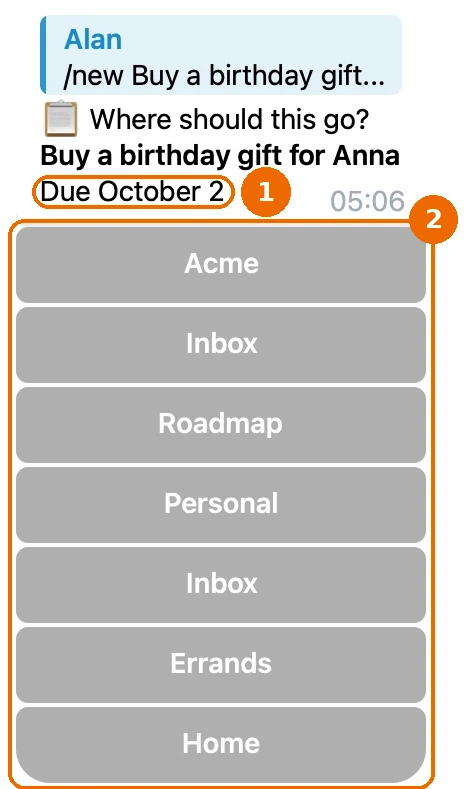
/newfollowed by the task. Name a day in the text if the task has one:text/new Buy a birthday gift for Anna on FridayThe bot replies Where should this go? with:
- the task title;
- Due and the day, or No due date;
- your lists as buttons, under the name of each workspace.
No list buttons?
If the bot says You have no list you can add tasks to yet., create a list in Hule and send
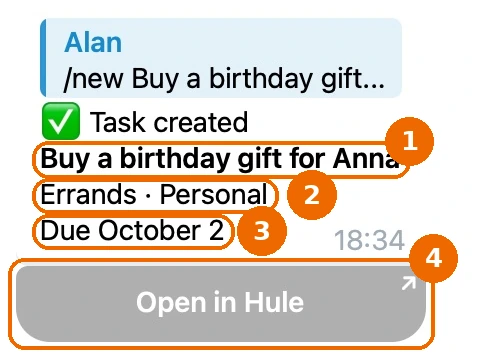
/newagain.Tap the list the task belongs in. If you keep an Inbox list, tap that one and sort the task later. The message changes to Task created, with:
- the task title;
- the list and workspace, such as
Errands · Personal; - the due date, or No due date;
- an Open in Hule button.
List not among the buttons?
The bot shows the first 24 lists, grouped by workspace. Pick any list that is shown and move the task later.
What the bot sets on the new task:
- It is assigned to you.
- Only the first line of your message becomes the title; the lines after it are left out.
- The day you named becomes its due date, and the words for the day are left out of the title.
Due days in the message
The bot finds the day anywhere in the message and reads a day, not a time of day:
| Form | Examples |
|---|---|
| Day word | today, tomorrow, day after tomorrow |
| Weekday | Friday, on fri: always the next one, so "Friday" sent on a Friday is a week later |
| Offset | in 3 days, in 2 weeks |
| Date | Oct 1, 1 Oct, 1.10, 1/10, 1.10.2026 |
Numbers are read day first
1/10 is October 1, not January 10. A date without a year is the next such day: today, if it is today; next year, if it has passed.
| You send | The bot creates |
|---|---|
/new Call the dentist tomorrow | "Call the dentist", due tomorrow |
/new Pay rent Oct 1 | "Pay rent", due the next October 1 (today, if today is October 1; next year, if it has passed) |
/new Plan the offsite in 2 weeks | "Plan the offsite", due 14 days from today |
Days count in the Time zone set in your notification settings (Set up notifications). If you belong to several workspaces, the bot uses the zone of the workspace you own (the oldest one, if you own several); if you own none, the zone of the first workspace you joined. Every command of the bot: Telegram bot commands.
If it doesn't work
The bot ignores your message. Only
/newcreates a task. Plain text without a command is not read (Telegram bot commands).You see "Your account is not connected yet." Connect Telegram in User settings → Sign-in (see Before you start), then send
/startagain.There is no Connect button in the Telegram row. You are in the desktop app. Open Hule in your browser and connect there.
You see "You have no list you can add tasks to yet." Create a list in Hule (Organize folders and lists) and send
/newagain.Your list is not among the buttons. The bot offers only lists you can add tasks to, up to 24, grouped by workspace, and says Showing the first … lists of … when there are more. Pick any list that is shown and move the task in Hule later.
The bot replies "Send /new followed by what needs doing". The message held only a day, or nothing after
/new. Add what needs doing:text/new Call Anna tomorrowThe due date is the wrong month. The bot reads numbers day first:
1/10is October 1. Fix the due date, or write the month as a word next time:text/new Pay rent Jan 10The due date is a day off. The bot counts days in your Time zone (Set up notifications) of the workspace you own, or of the first workspace you joined if you own none. Check that it is right there, then fix the due date.
A word in your title became the due date, such as "Sun" in "Read the Sun article". Tap Open in Hule, fix the due date, and add the word back to the title.
You see "This message has expired". The bot can no longer read your original message. Send
/newagain.
Related
- Telegram bot commands: every command in one table.
- Telegram bot for daily use: check what is due and close tasks from the chat.
- GTD in Hule: why capturing and sorting are separate steps.
- Capture tasks to your Inbox list: the other ways to capture.